CAST Highlight is a SaaS software intelligence platform for portfolio-level analysis of application modernization, cloud migration, and open-source risk. It scans hundreds of applications across 60+ technologies within days, combining automated code inspection with business context surveys.
With the Synopsys 2024 OSSRA report finding that 96% of commercial codebases contain open-source components, portfolio-level visibility into software composition has become a board-level concern.
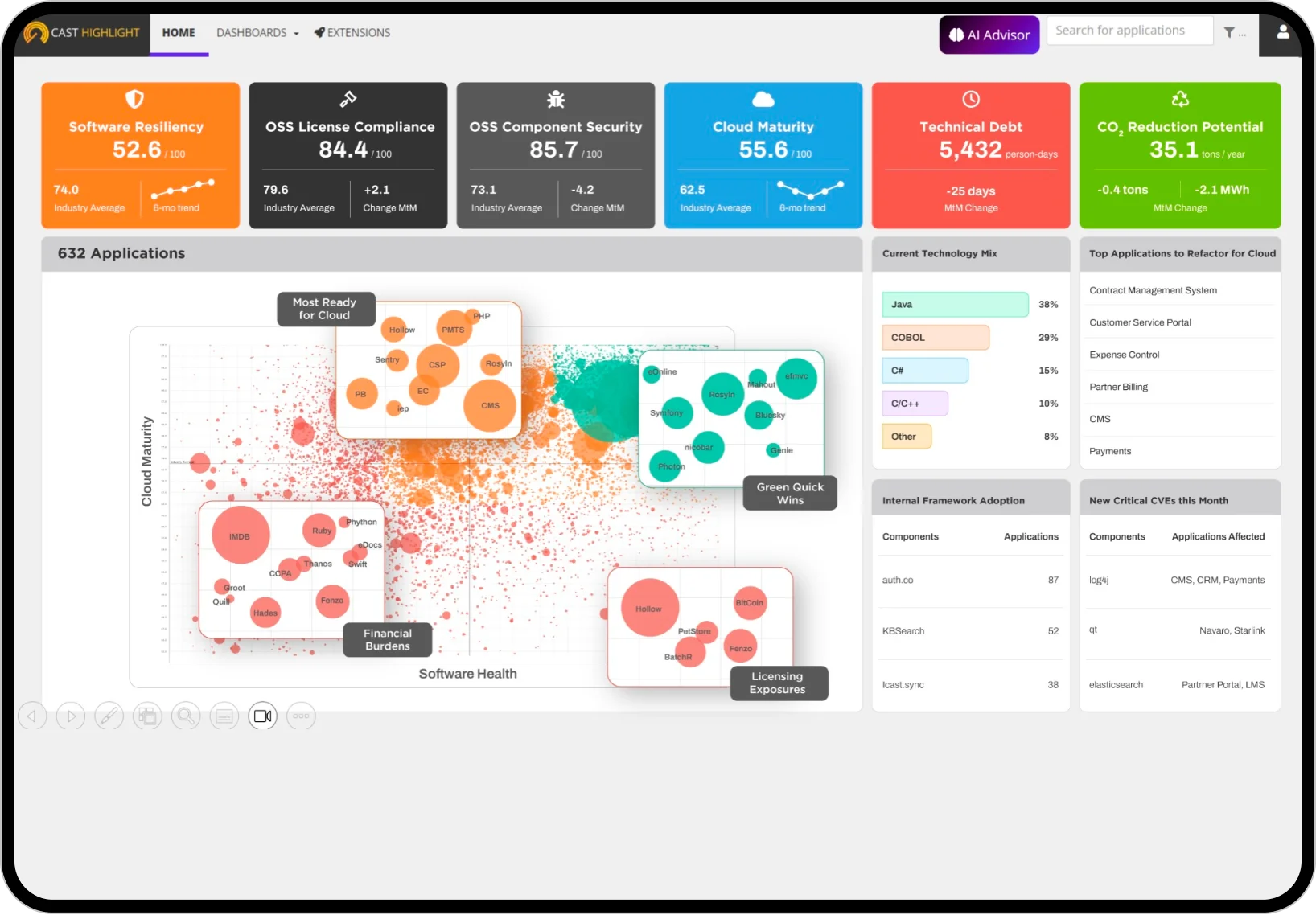
Unlike pure SCA tools that focus on vulnerability detection, CAST Highlight assesses applications across multiple dimensions: cloud readiness, software composition risks, technical debt, and business value alignment. It is designed for organizations managing large application portfolios making decisions about modernization, migration, and retirement.
What is CAST Highlight?
CAST Highlight scans source code to inventory open-source components, map vulnerabilities, identify cloud blockers, and measure technical debt. It pairs this with business context questionnaires to give a complete picture that technical metrics alone cannot provide.
Key features
Supported technologies
| Category | Technologies |
|---|---|
| Enterprise | Java, C#, COBOL, ABAP, PL/SQL, RPG |
| Web | JavaScript, TypeScript, PHP, Ruby, Python |
| Systems | C, C++, Go, Rust |
| Mobile | Swift, Kotlin, Objective-C |
| Data | SQL, R, MATLAB |
| Other | Scala, Perl, Shell, PowerShell |
| Total | 60+ technologies with automatic detection |
SBOM export formats
| Format | Output type |
|---|---|
| CycloneDX | Standard machine-readable SBOM |
| SPDX | ISO-standard SBOM format |
| Excel | Spreadsheet for portfolio analysis |
| Word | Document for stakeholder reports |
| PowerPoint | Presentation-ready summaries |
| XML | Machine-readable export |
Portfolio-scale analysis
Scan hundreds of applications in days. Automatic technology detection across 60+ languages with consistent scoring methodology.
Executive dashboards show comparative analysis and trend tracking over time.
Software composition analysis
Component inventory with version tracking, CVE vulnerability mapping, license compliance identification, risk scoring, obsolescence detection, and SBOM generation in standard formats.
Cloud readiness assessment
Identifies cloud blockers (stateful components, filesystem dependencies), provides platform-specific recommendations (AWS, Azure, GCP), scores containerization readiness, and estimates refactoring effort.
Technical debt analysis
Measures code complexity, maintainability scoring, dead code detection, architectural anti-pattern identification, and remediation effort estimation.
Installation and Setup
Agent-Based Scanning
CAST Highlight uses a lightweight agent to analyze source code:
# Download HighlightAutomation from the CAST Highlight portal
# (requires authentication — URL is provided after login)
unzip HighlightAutomation.zip

# Run a scan
java -jar HighlightAutomation.jar \
  --workingDir /path/to/source \
  --applicationName "my-application" \
  --companyId YOUR_COMPANY_ID \
  --serverUrl https://rpa.casthighlight.com
Command-Line Interface
The Java-based CLI (HighlightAutomation.jar) supports automation and CI/CD integration:
# Run a scan from the command line
java -jar HighlightAutomation.jar \
  --apiKey YOUR_API_KEY \
  --companyId YOUR_COMPANY_ID \
  --applicationName "my-application" \
  --sourceDir ./src \
  --upload

# Run with a properties file for reusable configuration
java -jar HighlightAutomation.jar -config highlight.properties
Chrome Extension
The CAST Highlight Chrome extension enables on-demand scanning while browsing repositories:
- Install the extension from the Chrome Web Store
- Navigate to a GitHub, GitLab, or Bitbucket repository
- Click the CAST Highlight icon in your browser toolbar
- View immediate security and risk analysis
- Export findings or add to your portfolio
Integration
GitHub Actions
name: CAST Highlight Analysis

on:
  push:
    branches: [main]
  schedule:
    - cron: '0 0 * * 0'  # Weekly Sunday midnight

jobs:
  highlight-scan:
    runs-on: ubuntu-latest
    steps:
      - name: Checkout code
        uses: actions/checkout@v4

      - name: Set up Java
        uses: actions/setup-java@v4
        with:
          distribution: 'temurin'
          java-version: '17'

      - name: Download CAST Highlight Agent
        run: |
          # Download from the CAST Highlight portal (requires authentication)
          # See: https://doc.casthighlight.com/product-tutorials-third-party-tools/automated-code-scan-command-line/
          curl -O https://rpa.casthighlight.com/api/agents/HighlightAutomation.zip
          unzip HighlightAutomation.zip

      - name: Run CAST Highlight Scan
        env:
          HIGHLIGHT_API_KEY: ${{ secrets.CAST_HIGHLIGHT_API_KEY }}
          HIGHLIGHT_COMPANY_ID: ${{ secrets.CAST_HIGHLIGHT_COMPANY_ID }}
        run: |
          java -jar HighlightAutomation.jar \
            --apiKey $HIGHLIGHT_API_KEY \
            --companyId $HIGHLIGHT_COMPANY_ID \
            --applicationName "${{ github.repository }}" \
            --sourceDir . \
            --upload

      - name: Generate SBOM
        run: |
          java -jar HighlightAutomation.jar sbom \
            --apiKey ${{ secrets.CAST_HIGHLIGHT_API_KEY }} \
            --applicationName "${{ github.repository }}" \
            --format cyclonedx \
            --output sbom.json

      - name: Upload SBOM
        uses: actions/upload-artifact@v4
        with:
          name: sbom
          path: sbom.json
GitLab CI
stages:
  - analyze

cast-highlight:
  stage: analyze
  image: openjdk:17-slim
  variables:
    HIGHLIGHT_API_KEY: $CAST_HIGHLIGHT_API_KEY
    HIGHLIGHT_COMPANY_ID: $CAST_HIGHLIGHT_COMPANY_ID
  script:
    - apt-get update && apt-get install -y curl unzip
    # Download from the CAST Highlight portal (requires authentication)
    # See: https://doc.casthighlight.com/product-tutorials-third-party-tools/automated-code-scan-command-line/
    - curl -O https://rpa.casthighlight.com/api/agents/HighlightAutomation.zip
    - unzip HighlightAutomation.zip
    - |
      java -jar HighlightAutomation.jar \
        --apiKey $HIGHLIGHT_API_KEY \
        --companyId $HIGHLIGHT_COMPANY_ID \
        --applicationName $CI_PROJECT_NAME \
        --sourceDir . \
        --upload
    - |
      java -jar HighlightAutomation.jar sbom \
        --apiKey $HIGHLIGHT_API_KEY \
        --applicationName $CI_PROJECT_NAME \
        --format spdx \
        --output sbom-spdx.json
  artifacts:
    paths:
      - sbom-spdx.json
    expire_in: 90 days
  rules:
    - if: $CI_COMMIT_BRANCH == $CI_DEFAULT_BRANCH
    - if: $CI_PIPELINE_SOURCE == "schedule"
REST API Integration
CAST Highlight exposes a REST API at rpa.casthighlight.com/WS2/ using Basic authentication:
# Get applications in a domain
curl -X GET "https://rpa.casthighlight.com/WS2/domains/{domainId}/applications/" \
  -H "Authorization: Basic $(echo -n 'user:password' | base64)"

# Get application details
curl -X GET "https://rpa.casthighlight.com/WS2/domains/{domainId}/applications/{appId}" \
  -H "Authorization: Basic $(echo -n 'user:password' | base64)"

# Get third-party components for an application
curl -X GET "https://rpa.casthighlight.com/WS2/domains/{domainId}/applications/{appId}/thirdparty" \
  -H "Authorization: Basic $(echo -n 'user:password' | base64)"
Setup
When to use CAST Highlight
CAST Highlight is the right choice for organizations managing large application portfolios that need strategic decision support alongside SCA capabilities.
Strengths:
- Portfolio-level visibility across hundreds of applications
- Cloud readiness assessment with migration planning
- 60+ technology support including COBOL and ABAP
- SBOM export in 6+ formats (CycloneDX, SPDX, Excel, Word, PPT, XML)
- Chrome extension for quick repository scanning
Limitations:
- Not designed for real-time CI/CD build blocking
- SCA capabilities lighter than dedicated tools
- Better for strategic analysis than daily vulnerability management
- Commercial only
How it compares:
| vs. | Key difference |
|---|---|
| Black Duck | Black Duck has deeper SCA and license compliance. CAST Highlight adds cloud readiness, technical debt, and portfolio-level strategic analysis. |
| Snyk Open Source | Snyk is a developer-first CI/CD scanner. CAST Highlight is a portfolio analysis platform. Complementary tools for different use cases. |
Further reading: What is SCA? | What is SBOM?