
Contrast Scan is the static application security testing (SAST) component of the Contrast Security platform.
Supporting over 30 languages and frameworks, it provides enterprise-grade vulnerability detection with a free community edition that makes professional-quality SAST accessible to individual developers and small teams.
What is Contrast Scan?
Contrast Scan represents Contrast Security’s approach to static analysis, designed to complement their runtime security products (Contrast Assess for IAST and Contrast Protect for RASP).
The tool analyzes source code to identify security vulnerabilities before applications are deployed.
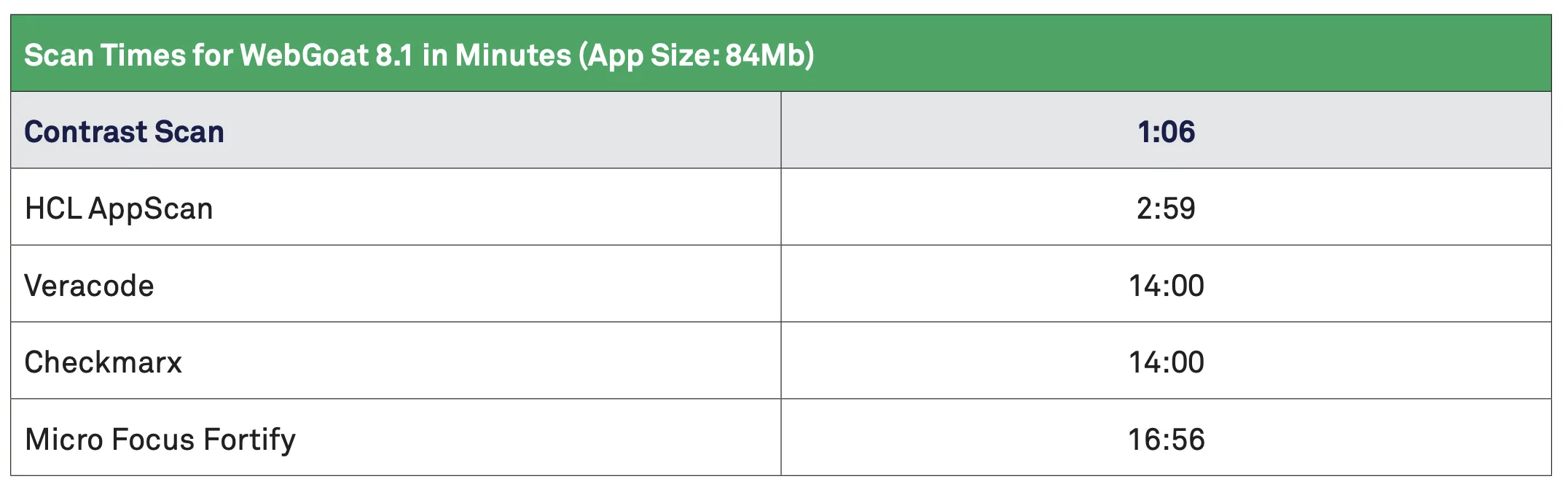
Unlike traditional SAST tools that often overwhelm developers with false positives, Contrast Scan emphasizes accuracy and actionability.
The platform uses semantic analysis to understand code context, reducing noise and delivering findings that developers can trust and act upon quickly.
The free Community Edition provides access to the full scanning engine with reasonable limits, making it an attractive option for open-source projects, startups, and developers learning secure coding practices.
This approach follows Contrast’s strategy of building developer trust before enterprise sales engagements.
Key Features
Semantic Code Analysis
Contrast Scan goes beyond pattern matching:
- Dataflow analysis tracking how data moves through applications
- Control flow analysis understanding execution paths
- Context-aware detection reducing false positives
- Framework-specific rules for common libraries
- Understanding of language idioms and patterns
Multi-Language Support
Comprehensive coverage across modern tech stacks:
- JVM languages: Java, Kotlin, Scala
- JavaScript ecosystem: JavaScript, Node.js, TypeScript
- .NET platform: C#, .NET Core, VB.NET
- Dynamic languages: Python, Ruby, PHP
- Systems programming: Golang
Vulnerability Detection
Coverage for critical security issues:
- Injection vulnerabilities (SQL, Command, LDAP, XPath)
- Cross-site scripting (XSS) in all forms
- Authentication and session management flaws
- Sensitive data exposure
- XML external entity (XXE) processing
- Insecure deserialization
- Security misconfiguration
- Cryptographic weaknesses
Developer-Friendly Results
Focus on actionable findings:
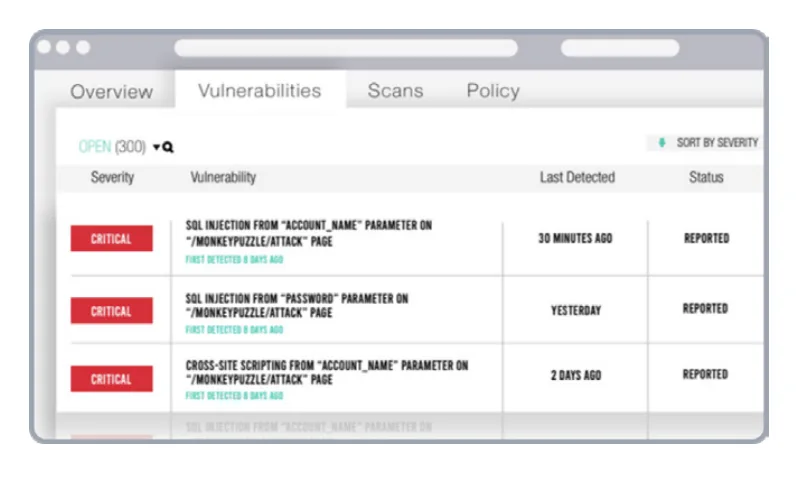
- Clear explanations of each vulnerability
- Code snippets showing the exact issue location
- Remediation guidance with code examples
- Severity ratings based on exploitability
- CWE and OWASP mapping for compliance
Installation
Community Edition Setup
Get started with the free Community Edition:
# Sign up at contrastsecurity.com/contrast-scan
# Download the CLI after registration
# macOS/Linux
curl -L https://pkg.contrastsecurity.com/contrast-scan/latest/contrast-scan-cli \
-o contrast-scan
chmod +x contrast-scan
# Windows (PowerShell)
Invoke-WebRequest -Uri "https://pkg.contrastsecurity.com/contrast-scan/latest/contrast-scan-cli.exe" `
-OutFile contrast-scan.exe
CLI Usage
# Authenticate with your API credentials
contrast-scan auth \
--api-key YOUR_API_KEY \
--service-key YOUR_SERVICE_KEY \
--org-id YOUR_ORG_ID
# Scan a project
contrast-scan scan \
--project-name "my-application" \
--source ./src \
--language java
# Scan with specific output format
contrast-scan scan \
--project-name "my-application" \
--source ./src \
--output-format sarif \
--output-file results.sarif
# Scan with severity threshold
contrast-scan scan \
--project-name "my-application" \
--source ./src \
--fail-on-severity high
IDE Integration
VS Code
# Install the Contrast Security extension
code --install-extension contrast-security.contrast-scan
# Configure in settings.json
{
"contrastScan.apiKey": "${env:CONTRAST_API_KEY}",
"contrastScan.serviceKey": "${env:CONTRAST_SERVICE_KEY}",
"contrastScan.orgId": "${env:CONTRAST_ORG_ID}",
"contrastScan.scanOnSave": true
}
JetBrains IDEs
- Open Settings/Preferences
- Navigate to Plugins > Marketplace
- Search for “Contrast Security”
- Install and restart IDE
- Configure credentials in Settings > Tools > Contrast Security
Configuration File
Create a contrast-scan.yaml in your project root:
project:
name: my-application
language: java
scan:
include:
- src/main/java/**
exclude:
- src/test/**
- "**/generated/**"
rules:
disabled:
- low-severity-info-disclosure
severity_threshold: medium
reporting:
format: sarif
output: contrast-scan-results.sarif
Integration
GitHub Actions
name: Contrast Scan Analysis
on:
push:
branches: [main]
pull_request:
branches: [main]
jobs:
contrast-scan:
runs-on: ubuntu-latest
steps:
- name: Checkout code
uses: actions/checkout@v4
- name: Set up Java
uses: actions/setup-java@v4
with:
distribution: 'temurin'
java-version: '17'
- name: Run Contrast Scan
uses: Contrast-Security-OSS/contrastscan-action@v2
with:
api-key: ${{ secrets.CONTRAST_API_KEY }}
service-key: ${{ secrets.CONTRAST_SERVICE_KEY }}
org-id: ${{ secrets.CONTRAST_ORG_ID }}
project-name: ${{ github.repository }}
language: java
fail-on-severity: high
- name: Upload SARIF results
uses: github/codeql-action/upload-sarif@v3
if: always()
with:
sarif_file: contrast-scan-results.sarif
GitLab CI
stages:
- security
contrast-scan:
stage: security
image: contrastsecurity/contrast-scan:latest
variables:
CONTRAST_API_KEY: $CONTRAST_API_KEY
CONTRAST_SERVICE_KEY: $CONTRAST_SERVICE_KEY
CONTRAST_ORG_ID: $CONTRAST_ORG_ID
script:
- contrast-scan scan
--project-name $CI_PROJECT_NAME
--source .
--language java
--output-format sarif
--output-file gl-sast-report.json
--fail-on-severity high
artifacts:
reports:
sast: gl-sast-report.json
paths:
- gl-sast-report.json
expire_in: 30 days
rules:
- if: $CI_PIPELINE_SOURCE == "merge_request_event"
- if: $CI_COMMIT_BRANCH == $CI_DEFAULT_BRANCH
Jenkins Pipeline
pipeline {
agent any
environment {
CONTRAST_API_KEY = credentials('contrast-api-key')
CONTRAST_SERVICE_KEY = credentials('contrast-service-key')
CONTRAST_ORG_ID = credentials('contrast-org-id')
}
stages {
stage('Checkout') {
steps {
checkout scm
}
}
stage('Contrast Scan') {
steps {
sh '''
curl -L https://pkg.contrastsecurity.com/contrast-scan/latest/contrast-scan-cli \
-o contrast-scan
chmod +x contrast-scan
./contrast-scan auth \
--api-key $CONTRAST_API_KEY \
--service-key $CONTRAST_SERVICE_KEY \
--org-id $CONTRAST_ORG_ID
./contrast-scan scan \
--project-name ${JOB_NAME} \
--source . \
--language java \
--output-format sarif \
--output-file contrast-results.sarif \
--fail-on-severity high
'''
}
}
}
post {
always {
archiveArtifacts artifacts: 'contrast-results.sarif', allowEmptyArchive: true
recordIssues(
tools: [sarif(pattern: 'contrast-results.sarif')]
)
}
}
}
Azure DevOps
trigger:
- main
pool:
vmImage: 'ubuntu-latest'
steps:
- task: UseJavaVersion@1
inputs:
versionSpec: '17'
- script: |
curl -L https://pkg.contrastsecurity.com/contrast-scan/latest/contrast-scan-cli \
-o contrast-scan
chmod +x contrast-scan
./contrast-scan auth \
--api-key $(CONTRAST_API_KEY) \
--service-key $(CONTRAST_SERVICE_KEY) \
--org-id $(CONTRAST_ORG_ID)
./contrast-scan scan \
--project-name $(Build.Repository.Name) \
--source . \
--language java \
--output-format sarif \
--output-file $(Build.ArtifactStagingDirectory)/contrast-results.sarif
displayName: 'Run Contrast Scan'
- task: PublishBuildArtifacts@1
inputs:
pathToPublish: '$(Build.ArtifactStagingDirectory)'
artifactName: 'SecurityResults'
When to Use Contrast Scan
Contrast Scan is particularly well-suited for teams that:
- Want to try SAST without commitment using the generous free tier
- Need accurate results with low false positive rates
- Use the Contrast platform and want unified SAST/IAST/RASP
- Develop in supported languages especially Java, .NET, or JavaScript
- Value IDE integration for shift-left security feedback
- Need SARIF output for GitHub Security integration
Consider alternatives if you need:
- Broader language support (consider Checkmarx or Veracode)
- Deep customization with custom rules (consider Semgrep)
- Open-source tooling (consider Semgrep OSS or Bandit)
- Compliance-focused reporting for regulated industries
Contrast Scan works best as part of the broader Contrast Security platform, where it complements Contrast Assess (IAST) and Contrast Protect (RASP) to provide security coverage across the entire application lifecycle.