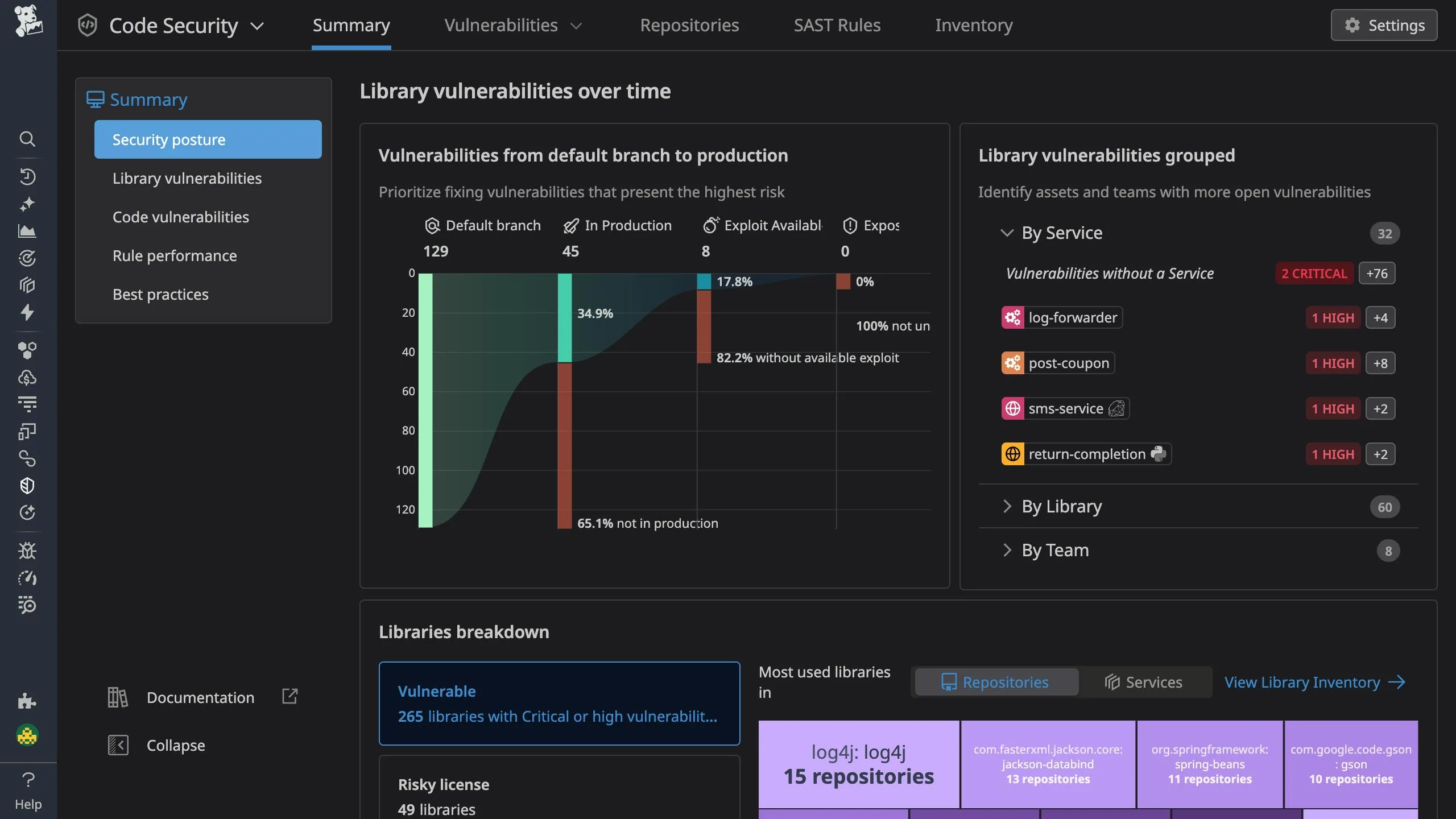

Datadog Code Security provides IAST (Interactive Application Security Testing) through runtime analysis that detects vulnerabilities in application code as it executes, using the same tracing libraries that power Datadog APM.
What is Datadog Code Security (IAST)?
Datadog’s IAST capability monitors live applications to identify security vulnerabilities by tracking how data flows through code at runtime.
Unlike static analysis that examines source code, IAST observes actual execution paths and detects when untrusted input reaches security-sensitive operations.
The technology achieves this by instrumenting applications through Datadog’s tracing libraries.
As requests flow through your application, the tracer monitors data sources (user input, external APIs) and sinks (database queries, file operations, system commands).
When untrusted data reaches a sink without proper validation, Datadog flags the vulnerability with the exact code location and data flow.
Datadog reports a 100% true positive rate on the OWASP Benchmark, meaning it correctly identifies all test vulnerabilities while producing no false positives.
This accuracy comes from analyzing actual runtime behavior rather than making assumptions about code paths.
Key Features
Runtime Vulnerability Detection
IAST detects vulnerabilities that require runtime context to identify:
- SQL Injection: Tracks user input through string concatenation to database queries
- Command Injection: Identifies when external input reaches system command execution
- Path Traversal: Detects unsanitized input in file system operations
- LDAP Injection: Monitors input flowing to directory service queries
- XSS (Reflected/Stored): Tracks data from input to output rendering
- Insecure Deserialization: Identifies dangerous deserialization of untrusted data
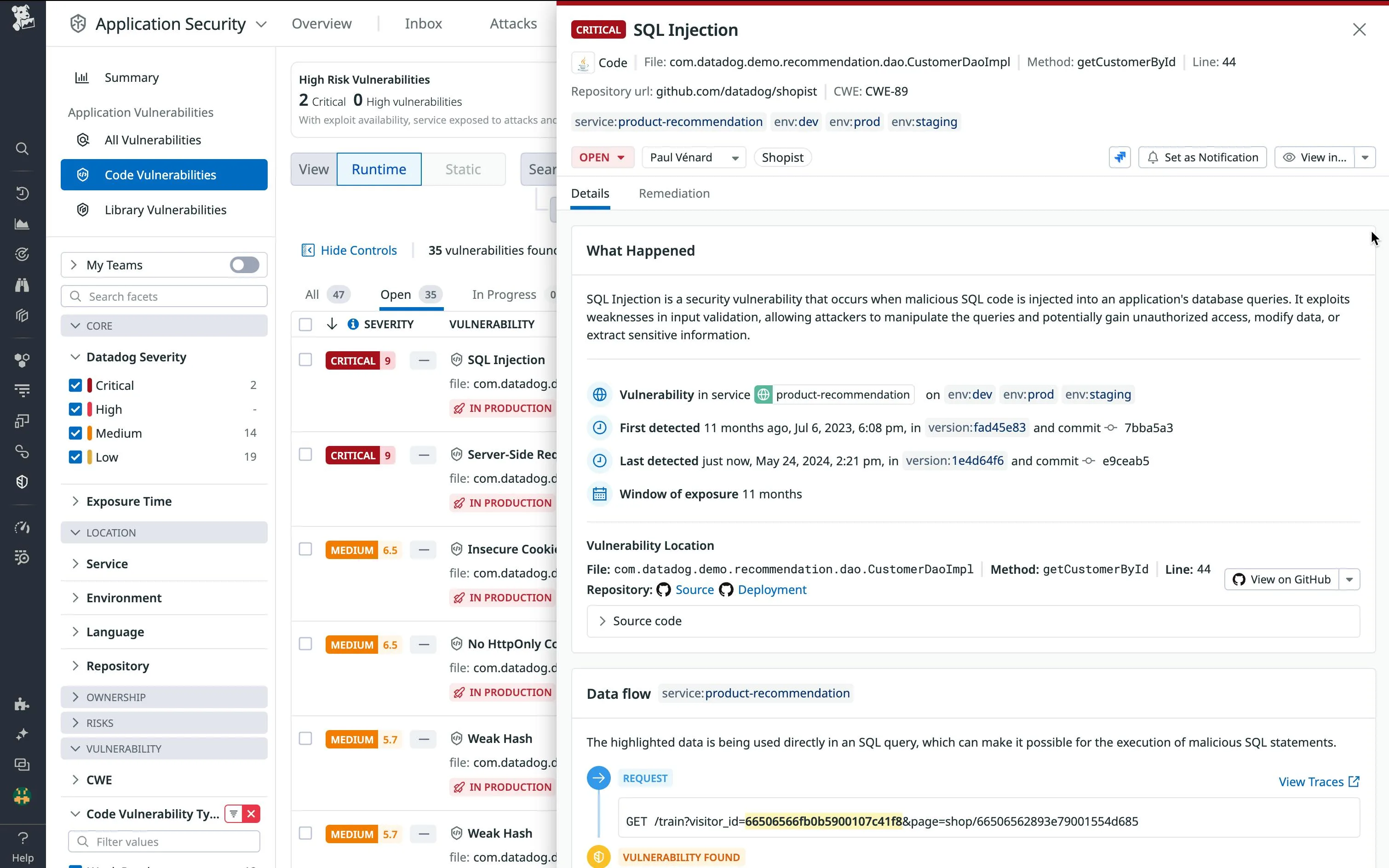
For each vulnerability, Datadog provides:
- The specific file and line number where the vulnerability exists
- The complete data flow from source to sink
- The tainted data that triggered detection
- Remediation guidance specific to your framework
Data Flow Visualization
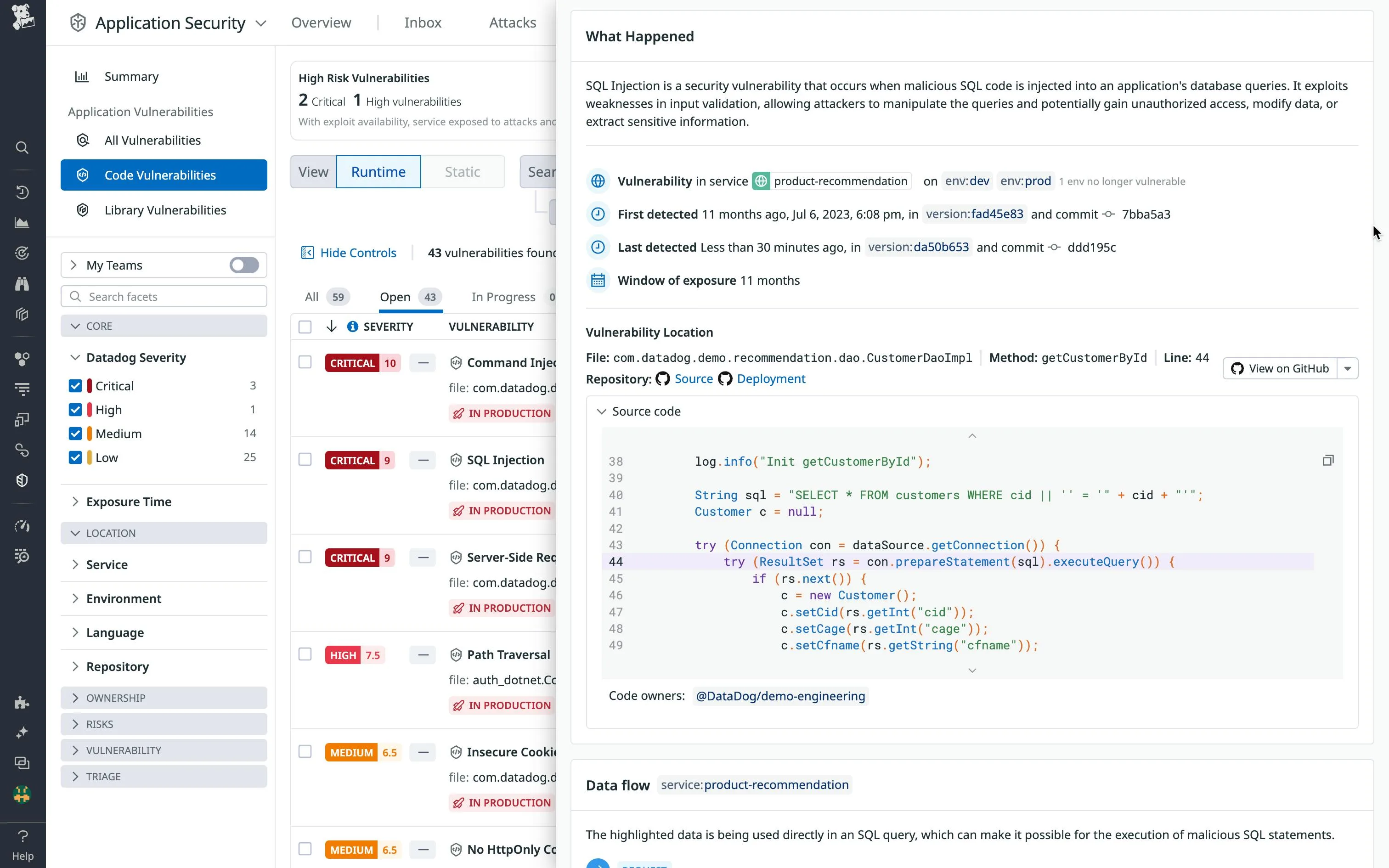
When a vulnerability is detected, Datadog visualizes the complete path that data traveled through your application.
This trace shows:
Request Parameter 'id' → Controller.getUser() → UserService.find() → SQL Query
└── Tainted: "1 OR 1=1" line 42 line 78 line 112
Developers can see exactly how user input reached the vulnerable code path, making remediation straightforward.
The visualization integrates with distributed tracing, showing cross-service data flows in microservices architectures.
APM and Observability Integration
Vulnerability findings appear alongside performance data in Datadog:
- See which endpoints have vulnerabilities and their traffic volume
- Correlate vulnerabilities with error rates and latency
- Identify whether vulnerable code paths are actually reached in production
- Track vulnerability remediation alongside deployment metrics
This integration helps prioritize remediation by showing which vulnerabilities affect high-traffic, business-critical endpoints.
Source Code Integration
Connect Datadog to your GitHub repositories to enhance vulnerability reports:
- View the vulnerable code directly in Datadog without switching tools
- See git blame information to identify who introduced the vulnerability
- Link to the exact commit that introduced the issue
- Create GitHub issues directly from vulnerability findings
Installation
Datadog IAST uses the same tracing libraries as Datadog APM.
Enable it by adding configuration flags to your existing Datadog instrumentation.
Java Installation
# Download the Datadog Java tracer
curl -L https://dtdg.co/latest-java-tracer -o dd-java-agent.jar
# Run with IAST enabled
java -javaagent:dd-java-agent.jar \
-Ddd.iast.enabled=true \
-Ddd.service=my-service \
-Ddd.env=staging \
-jar your-application.jar
For Spring Boot applications with Maven:
<!-- pom.xml -->
<build>
<plugins>
<plugin>
<groupId>org.springframework.boot</groupId>
<artifactId>spring-boot-maven-plugin</artifactId>
<configuration>
<jvmArguments>
-javaagent:${project.basedir}/dd-java-agent.jar
-Ddd.iast.enabled=true
</jvmArguments>
</configuration>
</plugin>
</plugins>
</build>
.NET Installation
# Install the Datadog .NET tracer
dotnet add package Datadog.Trace
# Or download the MSI installer for IIS applications
Enable IAST via environment variables:
$env:DD_IAST_ENABLED = "true"
$env:DD_SERVICE = "my-service"
$env:DD_ENV = "staging"
dotnet run
For IIS applications, configure in web.config:
<configuration>
<appSettings>
<add key="DD_IAST_ENABLED" value="true" />
<add key="DD_SERVICE" value="my-service" />
</appSettings>
</configuration>
Python Installation
pip install ddtrace
Run your application with IAST enabled:
DD_IAST_ENABLED=true DD_SERVICE=my-service ddtrace-run python app.py
For Django:
DD_IAST_ENABLED=true ddtrace-run python manage.py runserver
Node.js Installation
npm install dd-trace
Initialize with IAST in your application entry point:
require('dd-trace').init({
iast: {
enabled: true
},
service: 'my-service',
env: 'staging'
});
// Your application code
const express = require('express');
Integration
CI/CD Pipeline Integration
Run IAST during integration tests to catch vulnerabilities before deployment:
# GitHub Actions example
name: Security Testing with Datadog IAST
on:
pull_request:
branches: [main]
jobs:
iast-testing:
runs-on: ubuntu-latest
services:
postgres:
image: postgres:14
env:
POSTGRES_PASSWORD: test
steps:
- uses: actions/checkout@v4
- name: Set up Java
uses: actions/setup-java@v4
with:
java-version: '17'
distribution: 'temurin'
- name: Download Datadog agent
run: curl -L https://dtdg.co/latest-java-tracer -o dd-java-agent.jar
- name: Run application with IAST
env:
DD_API_KEY: ${{ secrets.DD_API_KEY }}
DD_SITE: datadoghq.com
DD_IAST_ENABLED: true
DD_ENV: ci
DD_SERVICE: my-service
run: |
java -javaagent:dd-java-agent.jar -jar target/app.jar &
sleep 30 # Wait for startup
- name: Run integration tests
run: ./gradlew integrationTest
- name: Check for vulnerabilities
env:
DD_API_KEY: ${{ secrets.DD_API_KEY }}
DD_APP_KEY: ${{ secrets.DD_APP_KEY }}
run: |
# Query IAST findings from the test run
VULNS=$(curl -s "https://api.datadoghq.com/api/v2/security_monitoring/signals" \
-H "DD-API-KEY: $DD_API_KEY" \
-H "DD-APPLICATION-KEY: $DD_APP_KEY" \
-G --data-urlencode "filter[query]=service:my-service env:ci @workflow.rule.type:iast" \
--data-urlencode "filter[from]=now-1h")
COUNT=$(echo $VULNS | jq '.data | length')
if [ "$COUNT" -gt 0 ]; then
echo "Found $COUNT IAST vulnerabilities"
echo $VULNS | jq '.data[].attributes.title'
exit 1
fi
# GitLab CI example
stages:
- build
- test
- security
iast-scan:
stage: security
variables:
DD_IAST_ENABLED: "true"
DD_ENV: "ci"
DD_SERVICE: "my-service"
script:
- curl -L https://dtdg.co/latest-java-tracer -o dd-java-agent.jar
- java -javaagent:dd-java-agent.jar -jar target/app.jar &
- sleep 30
- ./run-integration-tests.sh
- |
# Check for vulnerabilities detected during tests
VULNS=$(curl -s "https://api.datadoghq.com/api/v2/security_monitoring/signals" \
-H "DD-API-KEY: $DD_API_KEY" \
-H "DD-APPLICATION-KEY: $DD_APP_KEY" \
-d '{"filter": {"query": "service:my-service env:ci"}}')
if [ $(echo $VULNS | jq '.data | length') -gt 0 ]; then
echo "IAST detected vulnerabilities"
exit 1
fi
rules:
- if: $CI_PIPELINE_SOURCE == "merge_request_event"
GitHub Integration
Connect Datadog to GitHub for enhanced vulnerability context:
- Navigate to Integrations > GitHub in Datadog
- Authorize Datadog to access your repositories
- Map services to repositories in APM > Service Catalog
Once connected, vulnerability reports include:
- Direct links to vulnerable code in GitHub
- Author information from git blame
- One-click issue creation in the relevant repository
When to Use Datadog Code Security (IAST)
Ideal for organizations that:
- Already use Datadog APM and want integrated security
- Need accurate vulnerability detection with minimal false positives
- Want visibility into how vulnerabilities are reached at runtime
- Run staging or QA environments where IAST agents can be deployed
- Require code-level remediation guidance for developers
- Work in microservices environments where data flows cross services
Consider alternatives if:
- You need to scan code before it runs (use SAST instead)
- Your applications use languages not supported by Datadog tracers
- Performance overhead from instrumentation is unacceptable for your use case
- You prefer standalone security tools not tied to an observability platform
Datadog IAST brings vulnerability detection into the observability workflow, making security findings actionable alongside the performance and reliability data developers already monitor.
The 100% OWASP Benchmark accuracy means findings require investigation, not triage of false positives.