

esChecker is a Mobile Application Security Testing (MAST) solution built by eShard, a French cybersecurity company based in Pessac, France. The platform performs static, dynamic, and stress testing on Android and iOS mobile app binaries.
eShard describes esChecker as “the fastest and most effective way to prevent security regressions” across mobile application releases.
What is esChecker?
esChecker is powered by a DAST (Dynamic Application Security Testing) engine with IAST (Interactive Application Security Testing) capabilities. You upload your Android or iOS binary, and the platform runs security diagnostics aligned with OWASP MASVS and MASTG test cases.
The platform is designed for pre-production verification — teams run security tests before each release to catch regressions and new vulnerabilities. Results come with actionable remediation checklists.
eShard is primarily known for hardware security testing (chip side-channel attacks, fault injection) and binary analysis. esChecker brings that binary analysis expertise to mobile application security. Their customer base includes organizations like Thales, Visa, NXP Semiconductors, and DBS Bank, though it’s unclear which customers specifically use esChecker versus eShard’s hardware security products.
What are esChecker’s key features?
| Feature | Details |
|---|---|
| Testing Types | DAST engine with IAST capabilities |
| Analysis Modes | Static, dynamic, and stress testing |
| Platforms | Android, iOS (binary upload) |
| Standards | OWASP MASVS, OWASP MASTG test cases |
| Output | Remediation checklists, PDF reports |
| Collaboration | Multi-user platform |
| Trial | Free trial available on request |
OWASP MASVS Testing
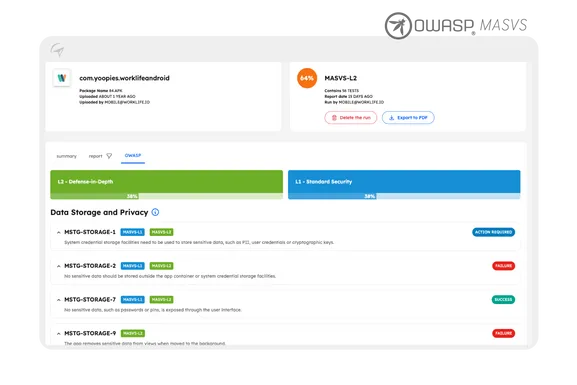
The screenshot from eShard’s official site shows esChecker’s OWASP view, where each MASTG test case (like MSTG-STORAGE-1, MSTG-STORAGE-2, etc.) is evaluated against MASVS levels L1 (Standard Security) and L2 (Defense-in-Depth). Results show clear pass/fail/action-required status for each test.
Interactive Application Security Testing (IAST) for Mobile
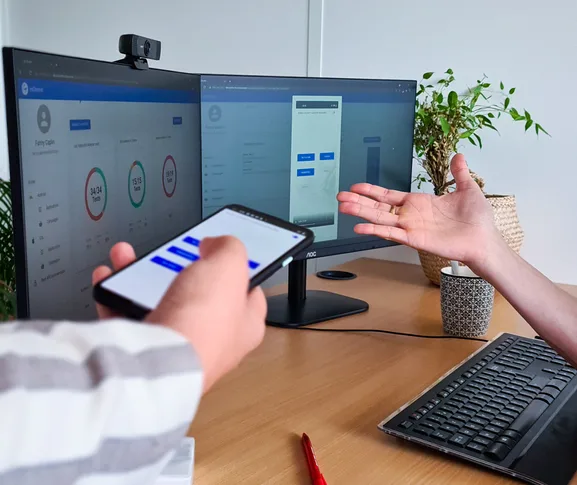
esChecker’s differentiator is IAST analysis for compiled mobile binaries. Where pure DAST exercises an app from the outside, IAST instruments the running binary so the platform can observe internal API calls, runtime data flows, and the security checks the app actually performs at execution time.
For obfuscated Android apps and stripped iOS binaries — where source-level SAST struggles — this binary-instrumented IAST view reaches behaviors that black-box DAST tools simply cannot see, which is what makes esChecker useful for mast tools with iast analysis style shortlists.
DevSecOps Integration
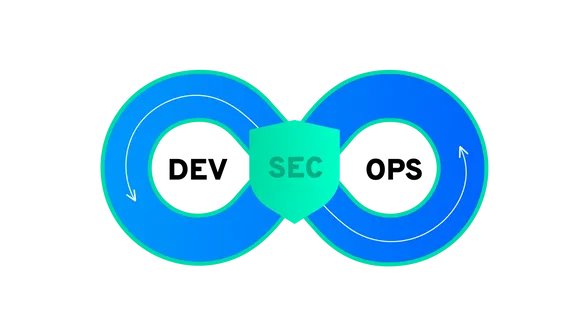
eShard positions esChecker as part of the DevSecOps pipeline, running security checks during the development cycle rather than only at the end.
How do I get started with esChecker?
How much does esChecker cost?
esChecker is a commercial platform — eShard does not publish dollar amounts and quotes every plan through sales. Licensing is per-app or per-organization, with the team-collaboration tier scaling on the number of users and projects.
A free trial is available on request, which is the path I would suggest to evaluate the platform before committing. Both cloud SaaS and on-premises deployment options are available, the latter being relevant for defense and fintech buyers in eShard’s existing customer base. Contact eShard with your app counts and deployment model to get a quote.
When to Use esChecker
esChecker fits teams that need OWASP MASVS-aligned mobile security testing as part of their pre-release process.
Consider esChecker when:
- OWASP MASVS compliance is a requirement for your mobile apps
- You need to prevent security regressions between releases
- Your team wants a collaborative platform for security assessments
- You value the combination of DAST and IAST analysis
esChecker has limited public documentation compared to larger mobile security platforms. For teams that need a well-documented open-source starting point, MobSF offers free static and dynamic analysis.
See the full mobile security tools category and my mobile app pentesting guide for the broader workflow.
What are alternatives to esChecker?
esChecker sits in the mobile DAST + IAST corner of the MAST market. The closest alternatives, depending on which slice matters most:
- NowSecure . Mature MAST platform with deep IAST analysis and strong privacy-test coverage. Often the head-to-head choice when buyers want US-headquartered support; esChecker tends to win where eShard’s binary-analysis pedigree matters (defense, fintech).
- Zimperium zScan. Static binary scanner inside the wider MAPS bundle. Pair with zDefend for runtime defense — broader scope than esChecker but less binary-instrumentation depth.
- Data Theorem Mobile Secure. Combines SAST + DAST + SCA + RASP for mobile, with continuous app-store monitoring. Wider full-stack coverage than esChecker, especially if you also need API and cloud security.
- Ostorlab Enterprise. Mobile + API + web scanner with an OSS edition (Asteroid). Closer feature parity with esChecker on the DAST side, lower entry price for mid-market teams.
- MobSF . Open-source MAST framework. The right starting point if you want to self-host and skip a commercial license — at the cost of no IAST instrumentation, no managed support, and no defense-grade compliance reporting.
For a wider view, see my mobile security tools hub.