


Fortify WebInspect is an enterprise DAST scanner from OpenText that tests running web applications and APIs for security vulnerabilities. It has been through three owners — HP, then Micro Focus, then OpenText — but remains one of the more established enterprise DAST tools on the market.
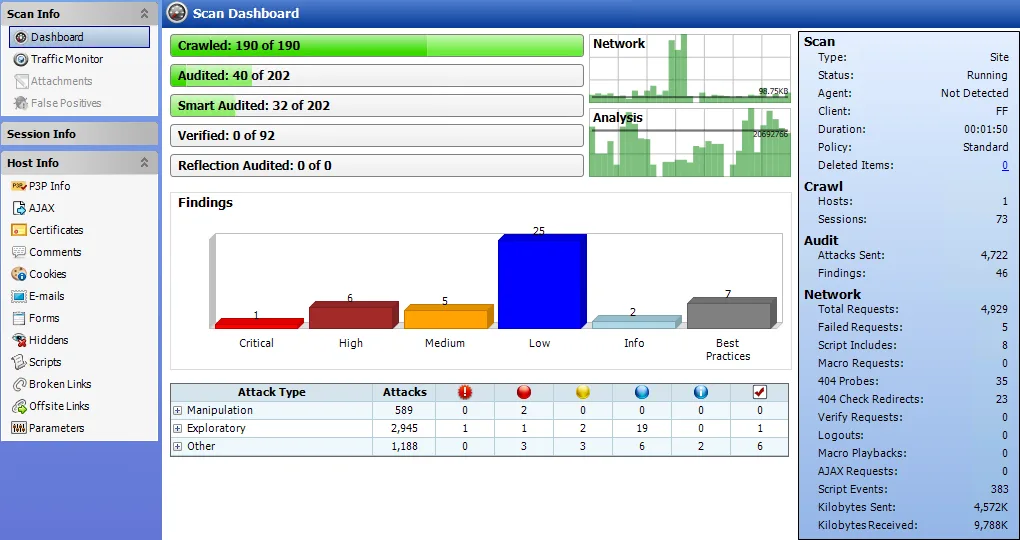
The scanner handles modern SPAs (React, Angular, Vue) and includes Kubernetes-based horizontal scaling for organizations with large scan workloads. Pre-configured compliance policies for PCI DSS, NIST, HIPAA, and ISO 27K ship out of the box.
Key features at a glance
| Feature | Detail |
|---|---|
| SPA Support | React, Angular, AngularJS, Vue, GWT, Dojo, Backbone |
| Web Technologies | HTML5, JSON, AJAX, JavaScript |
| FAST Testing | Functional + security testing combined |
| Scaling | Kubernetes horizontal scaling for parallel JS processing |
| Compliance Policies | PCI DSS, DISA STIG, NIST 800-53, ISO 27K, OWASP, HIPAA |
| API Testing | REST, SOAP endpoints |
| Deployment | On-premises, SaaS, managed service |
| Reporting | Line-of-code details with stack traces |
| Platform | Part of Fortify suite (SAST + DAST + SCA) |
| Ownership | OpenText (acquired from Micro Focus, 2023) |
What is Fortify WebInspect?
WebInspect performs black-box security testing by crawling and attacking running web applications. It simulates real-world external attacks to find SQL injection, XSS, authentication flaws, and other runtime vulnerabilities.
The tool specifically targets modern client-side frameworks. It detects and crawls SPAs built with React, Angular, AngularJS, Vue, GWT, Dojo, and Backbone — parsing the JavaScript to map application states that static crawlers would miss.
FAST testing
Functional Application Security Testing is WebInspect’s approach to combining functional tests with security scanning. Most IAST tools depend on functional test coverage to find vulnerabilities — if the test doesn’t hit a code path, the IAST misses bugs there.
FAST works differently. It hooks into functional test execution but also continues crawling the application independently. This means it tests code paths that functional tests don’t cover, which increases vulnerability coverage without requiring more test cases.
SPA and JavaScript handling
WebInspect’s JavaScript engine processes client-side code to discover application states and routes. For React, Angular, and Vue apps, this means it can follow client-side navigation, handle dynamic form rendering, and test AJAX-driven interactions.
Kubernetes containerization splits the JavaScript processing across multiple workers. For large SPAs with hundreds of routes, this parallel processing measurably reduces scan time compared to single-threaded approaches.
How to use Fortify WebInspect
CI/CD integration
# GitHub Actions
name: Fortify WebInspect DAST
on: [push]

jobs:
  webinspect:
    runs-on: ubuntu-latest
    steps:
      - uses: actions/checkout@v4
      - name: Run WebInspect Scan
        uses: fortify/github-action@v1
        with:
          ssc-url: ${{ secrets.SSC_URL }}
          ssc-token: ${{ secrets.SSC_TOKEN }}
          scan-type: 'dast'
          target-url: 'https://staging.example.com'
WebInspect also integrates with Jenkins (via Fortify plugin), Azure DevOps, and Bamboo.
Integrations
 GitHub Actions
 Jenkins
 Azure DevOps
 Bamboo
 Jira
JiraWhen to use Fortify WebInspect
WebInspect fits enterprises that need DAST with compliance reporting and flexible deployment. The on-premises option is critical for regulated industries — finance, healthcare, government — where scan data must stay on-network.
Good fit when you need:
- SPA scanning for React, Angular, or Vue applications
- Pre-configured compliance policies (PCI DSS, NIST, HIPAA, ISO 27K)
- On-premises deployment for regulated environments
- Kubernetes scaling for large scan workloads
- Integration with existing Fortify SAST and SCA tools
The ownership changes (HP → Micro Focus → OpenText) are worth tracking. So far, OpenText has continued investing in the product. Organizations already in the Fortify ecosystem get the most value from WebInspect since it shares the same management console and reporting as Fortify Static Code Analyzer.
Cloud-native teams without compliance requirements may find lighter DAST tools like StackHawk or Bright Security easier to get started with.
Note: Now under OpenText. Ownership: HP → Micro Focus → OpenText.


Comments
Powered by Giscus — comments are stored in GitHub Discussions.