
HCL AppScan DAST is an enterprise dynamic application security testing tool and the scanning core of the AppScan 360° platform. It was named a Leader in the 2025 Gartner Magic Quadrant for Application Security Testing.
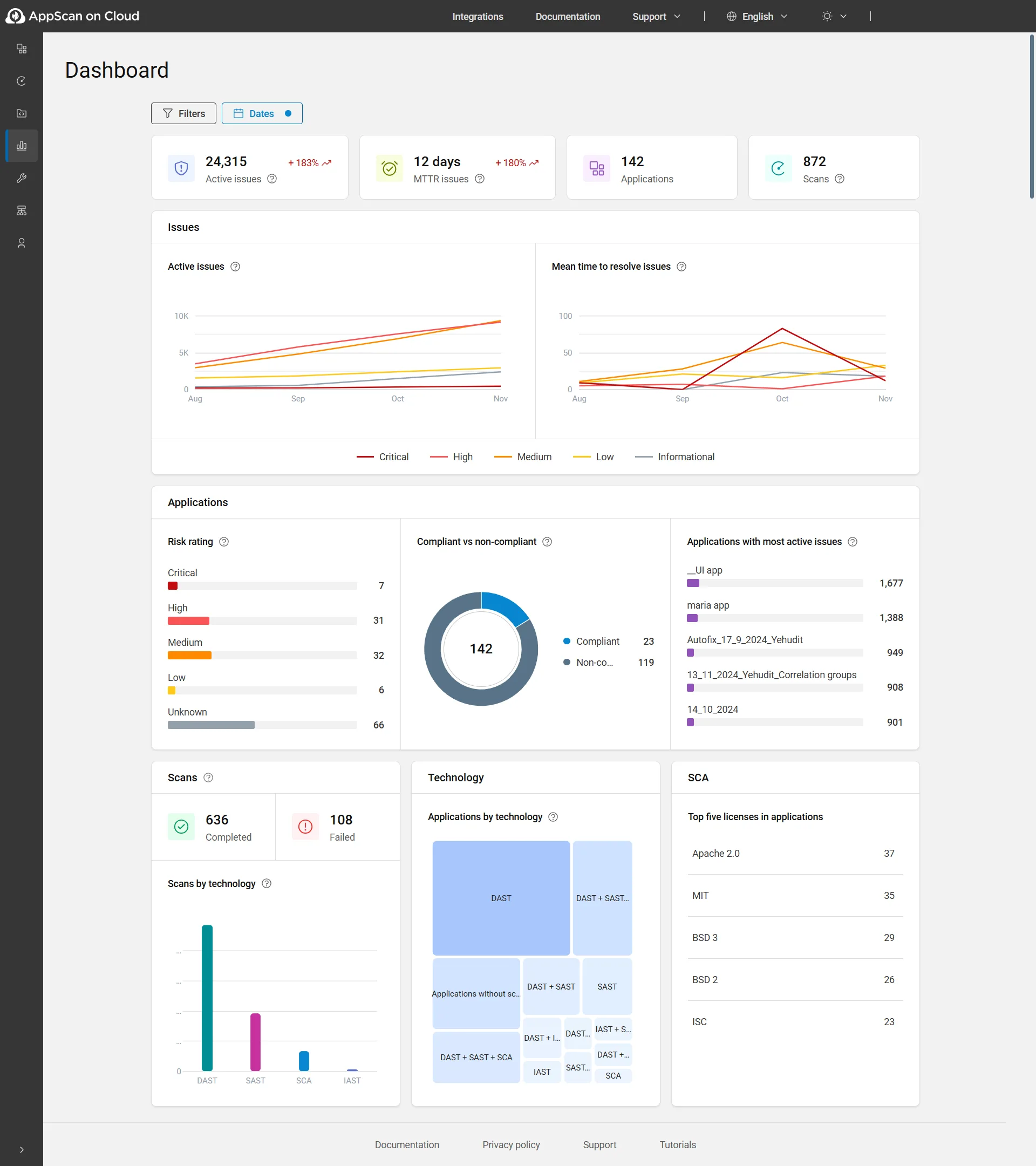
The tool evolved from IBM AppScan, which HCL acquired in 2019. Since then, HCL has added AI-enabled scanning, agentic triage (RapidFix), API security testing, and a cloud-native deployment option alongside the traditional on-premises install.
FIPS 140-3 compliance makes it one of the few DAST tools approved for US federal government use.
Key features at a glance
| Feature | Detail |
|---|---|
| Gartner Recognition | Leader, 2025 Magic Quadrant for AST |
| Platform | AppScan 360° (DAST, SAST, IAST, SCA, API, IaC) |
| AI Features | AI-enabled scanning + RapidFix agentic triage |
| Federal Compliance | FIPS 140-3 certified |
| Regulatory Reports | PCI DSS, HIPAA, GDPR, SOC 2 |
| API Testing | REST, SOAP, OpenAPI/Swagger, GraphQL schema import |
| Deployment | Cloud (AppScan on Cloud), on-premises (Standard/Enterprise), AppScan 360 (anywhere) |
| Presence Agent | Docker container for hybrid cloud/on-prem scanning |
| CI/CD | GitHub Actions, Jenkins, Azure DevOps (official actions) |
| Origin | IBM AppScan → HCL (acquired 2019) |
What is HCL AppScan DAST?
AppScan performs black-box security testing by crawling and attacking running web applications. It targets SQL injection, XSS, authentication flaws, and other runtime vulnerabilities that static analysis can’t find.
According to the OWASP Testing Guide, dynamic testing is the only way to detect certain classes of runtime vulnerabilities such as authentication bypass and session management flaws.
The AI engine learns application behavior patterns to focus testing on high-risk areas. Smart crawling adapts to application structure, which helps reduce scan time on large apps without sacrificing coverage.
AppScan 360° platform
DAST is one component of the broader AppScan 360° platform. The full suite includes:
- AppScan on Cloud — Cloud-based SaaS with DAST, SAST, IAST, SCA, and API testing
- AppScan 360 — Cloud-native architecture deployable anywhere (cloud, on-prem, hybrid)
- AppScan Standard — Desktop DAST tool for web apps and APIs
- AppScan Enterprise — Enterprise-scale DAST, IAST, and SAST with centralized management
- AppScan Source — Static analysis (SAST)
- AppScan CodeSweep — Developer-focused SAST
- AppScan API Security — API discovery, testing, and posture governance
- AppScan RapidFix — AI-driven triage and fix recommendations
Findings from all products correlate in a single dashboard, so a vulnerability found by both DAST and SAST shows up as one item, not two.
Deployment options
AppScan supports three deployment models:
- Cloud: AppScan on Cloud — no installation, managed by HCL
- On-premises: AppScan Standard (desktop) or Enterprise (server) for air-gapped environments
- Hybrid: AppScan Presence agent (Docker container) connects on-prem targets to cloud scanning
The Presence agent is useful for organizations that want cloud-based management but need to scan internal applications that aren’t internet-accessible.
The on-premises deployment with FIPS 140-3 compliance is a hard requirement for US government agencies and many financial institutions. NIST SP 800-53 mandates the use of FIPS-validated cryptographic modules for systems processing federal data.
If you need DAST in an air-gapped environment with federal security certification, AppScan is one of very few options.
How to use HCL AppScan DAST
CI/CD integration
# GitHub Actions
name: HCL AppScan DAST
on: [push]

jobs:
  appscan:
    runs-on: ubuntu-latest
    steps:
      - uses: actions/checkout@v4
      - name: Run AppScan DAST
        uses: HCL-TECH-SOFTWARE/appscan-dast-action@v1
        with:
          asoc_key: ${{ secrets.APPSCAN_KEY }}
          asoc_secret: ${{ secrets.APPSCAN_SECRET }}
          application_id: ${{ secrets.APP_ID }}
          dynamic_scan_type: 'dast'
          starting_URL: 'https://staging.example.com'
AppScan also has official plugins for Jenkins and Azure DevOps.
Integrations
 GitHub Actions
 Jenkins
 Azure DevOps
 Jira
JiraWhen to use HCL AppScan DAST
AppScan fits enterprises that need DAST with compliance reporting, flexible deployment, and the option to run everything on-premises. The FIPS 140-3 certification makes it one of the few DAST tools suitable for US federal government use cases.
Good fit when you need:
- Gartner-recognized enterprise DAST platform
- FIPS 140-3 compliance for federal or regulated environments
- On-premises deployment for air-gapped networks
- Unified platform across DAST, SAST, IAST, and SCA
- Compliance reporting for PCI DSS, HIPAA, GDPR, SOC 2
- AI-powered triage to manage large volumes of findings
Organizations already in the HCL ecosystem benefit from the unified AppScan 360 platform.
Cloud-native teams without strict data residency requirements may find cloud-first DAST tools like Bright Security or Invicti easier to adopt.
For open-source alternatives, ZAP remains the most widely used free DAST scanner.
To understand how DAST fits alongside SAST and IAST in a testing strategy, see our SAST vs DAST vs IAST comparison.