SCANOSS is a lightweight SCA tool that detects open-source components by analyzing actual source code rather than just parsing manifest files.
The Open Source Software Knowledge Base (OSSKB) contains fingerprints from 100M+ open-source files, enabling detection of vendored code, copy-pasted snippets, and embedded libraries that traditional dependency scanners miss.
The Synopsys 2024 OSSRA report found that 53% of audited codebases contained license conflicts – the kind of risk snippet-level scanning is built to catch.
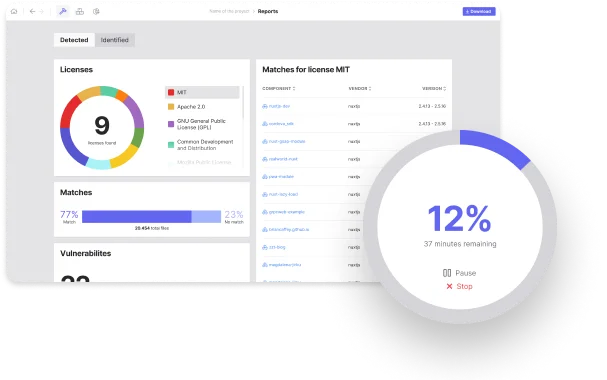
The Python scanner library is MIT licensed. SCANOSS runs scans locally using efficient fingerprinting algorithms, then queries the cloud database only for identified components. This architecture balances speed with comprehensive detection.
What is SCANOSS?
Most SCA tools parse manifest files like package.json or pom.xml. SCANOSS analyzes actual source files to find matches against millions of open-source projects.
If a developer copied a function from Stack Overflow, vendored a library, or embedded code without attribution, SCANOSS catches it.
Key features
Detection methods
| Method | What it finds |
|---|---|
| File fingerprinting | Whole files matching known open-source projects |
| Snippet detection | Partial code matches (copy-pasted functions, blocks) |
| Dependency analysis | Components declared in package manifests |
| Cryptographic detection | Crypto algorithms and implementations |
| License detection | License text in files, headers, and comments |
Output formats
| Format | Use case |
|---|---|
| JSON | Programmatic analysis and CI integration |
| SPDX JSON | Standard SBOM for compliance |
| CycloneDX JSON | Standard SBOM for vulnerability tracking |
| CSV | Spreadsheet analysis |
| Raw | Detailed fingerprint results |
Snippet detection
Beyond whole-file matching, SCANOSS detects code snippets embedded in your source files.
If a developer copied a function from Stack Overflow or an open-source project, the scanner identifies the source and associated license. This catches compliance issues that manifest-based tools overlook entirely.
SBOM generation
Generates SBOMs in SPDX and CycloneDX formats with component names, versions, licenses, and provenance information.
License compliance
Maps detected components to their licenses and highlights conflicts with your project’s licensing policy. Custom policies flag copyleft licenses, commercial restrictions, or terms requiring legal review.
Cryptographic detection
Identifies cryptographic algorithms and implementations in your codebase. Helps with export compliance (cryptography export controls) and security audits.
Codebase comparison
Compare two codebases to detect shared code. Useful for auditing acquisitions, third-party contributions, and internal code reuse.
Installation
Command Line Scanner
Install the Python-based scanner:
pip install scanoss
On macOS, use Homebrew:
brew install scanoss/dist/scanoss-py
Docker
docker pull ghcr.io/scanoss/scanoss-py
docker run -v $(pwd):/scanoss ghcr.io/scanoss/scanoss-py scan /scanoss
How to Use SCANOSS
Basic Scanning
Scan a directory and output results:
scanoss-py scan ./src --output results.json
Generate an SPDX SBOM:
scanoss-py scan ./src --format spdxlite --output sbom.spdx.json
Generate a CycloneDX SBOM:
scanoss-py scan ./src --output sbom.cdx.json --format cyclonedx
Skipping Files
Use --skip-extensions and --skip-folders flags to exclude files:
scanoss-py scan ./src --output results.json \
  --skip-extensions ".test.js,.spec.ts" \
  --skip-folders "node_modules,vendor"
Python API
from scanoss.scanner import Scanner

# Initialize scanner
scanner = Scanner()

# Scan a directory
scanner.scan_folder("./src")
Integration
GitHub Actions
name: SCANOSS SCA
on: [push, pull_request]

jobs:
  scan:
    runs-on: ubuntu-latest
    steps:
      - uses: actions/checkout@v4

      - name: Run SCANOSS Scan
        uses: scanoss/code-scan-action@v1
        with:
          output-path: results.json

      - name: Upload SBOM
        uses: actions/upload-artifact@v4
        with:
          name: sbom
          path: sbom.spdx.json

      - name: Check for policy violations
        run: |
          if grep -q "GPL-3.0" results.json; then
            echo "GPL-3.0 component detected - review required"
            exit 1
          fi
GitLab CI
scanoss:
  image: ghcr.io/scanoss/scanoss-py:latest
  script:
    - scanoss-py scan . --output results.json
    - scanoss-py scan . --output sbom.cdx.json --format cyclonedx
  artifacts:
    paths:
      - results.json
      - sbom.cdx.json
Jenkins Pipeline
pipeline {
    agent any
    stages {
        stage('SCANOSS Scan') {
            steps {
                sh 'pip install scanoss'
                sh 'scanoss-py scan . --output scanoss-results.json'
            }
        }
        stage('Check Licenses') {
            steps {
                script {
                    def results = readJSON file: 'scanoss-results.json'
                    // Custom license policy check
                }
            }
        }
    }
    post {
        always {
            archiveArtifacts artifacts: 'scanoss-results.json'
        }
    }
}
Setup
pip install scanoss for the Python scanner, or brew install scanoss/dist/scanoss-py on macOS.scanoss-py scan ./src --output results.json to analyze source code against the OSSKB.scanoss-py scan ./src --output sbom.spdx.json --format spdxlite for SPDX or --format cyclonedx for CycloneDX.scanoss/code-scan-action@v1 GitHub Action or add scanoss-py to your GitLab CI pipeline.When to use SCANOSS
SCANOSS fits when you need to detect open-source code beyond declared dependencies, especially vendored libraries, copy-pasted snippets, and embedded code.
Strengths:
- Detects vendored and copy-pasted code that manifest scanners miss
- 100M+ file knowledge base with snippet matching
- Cryptographic detection for export compliance
- Lightweight and fast scanning
- Freemium model with MIT-licensed scanner
Limitations:
- Smaller community (38 GitHub stars)
- Not a full vulnerability scanner; pair with a CVE-based tool
- Cloud API dependency for fingerprint matching
- Less CI/CD ecosystem integration than larger tools
How it compares:
| vs. | Key difference |
|---|---|
| Revenera Code Insight | Code Insight also scans source code but adds legal workflows, IP risk assessment, and M&A features. SCANOSS is lighter-weight and partially open-source. |
| FOSSA | FOSSA focuses on declared dependencies with license compliance. SCANOSS adds snippet detection for undeclared code. |
| Grype | Grype scans manifests for CVEs. SCANOSS scans source code for open-source usage. Different tools for different problems. |
Further reading: Open Source License Compliance | What is SCA?