Snyk Code

Snyk Code

Category: SAST
License: Commercial (Free tier available)

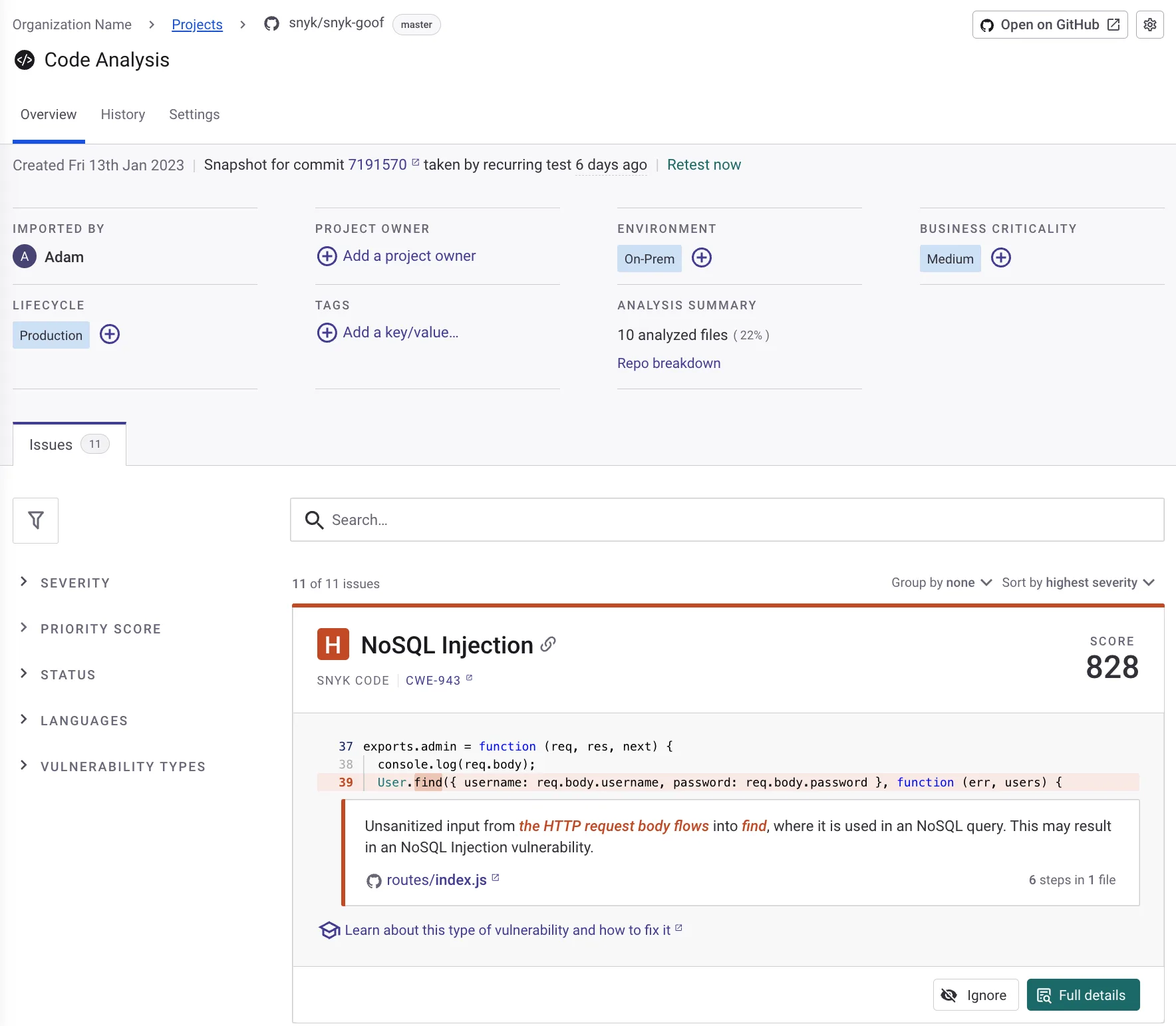
Snyk Code is a developer-first static application security testing (SAST) tool that uses semantic analysis and machine learning to find vulnerabilities in source code.

Part of the broader Snyk platform, it provides real-time security feedback directly in IDEs and integrates throughout the development lifecycle from code creation to deployment.

What is Snyk Code?

Snyk Code takes a fundamentally different approach to static analysis by combining traditional pattern matching with DeepCode AI, Snyk’s proprietary security-focused AI engine trained on millions of open-source projects.

This hybrid approach enables the tool to understand code semantically rather than just syntactically, resulting in more accurate detection with fewer false positives than traditional SAST tools.

The knowledge base models over 25 million data flow cases.

The platform scans code in real-time as developers write it, providing immediate feedback without requiring builds or compilation.

This shift-left approach catches security issues at the earliest possible stage when they are cheapest and easiest to fix.

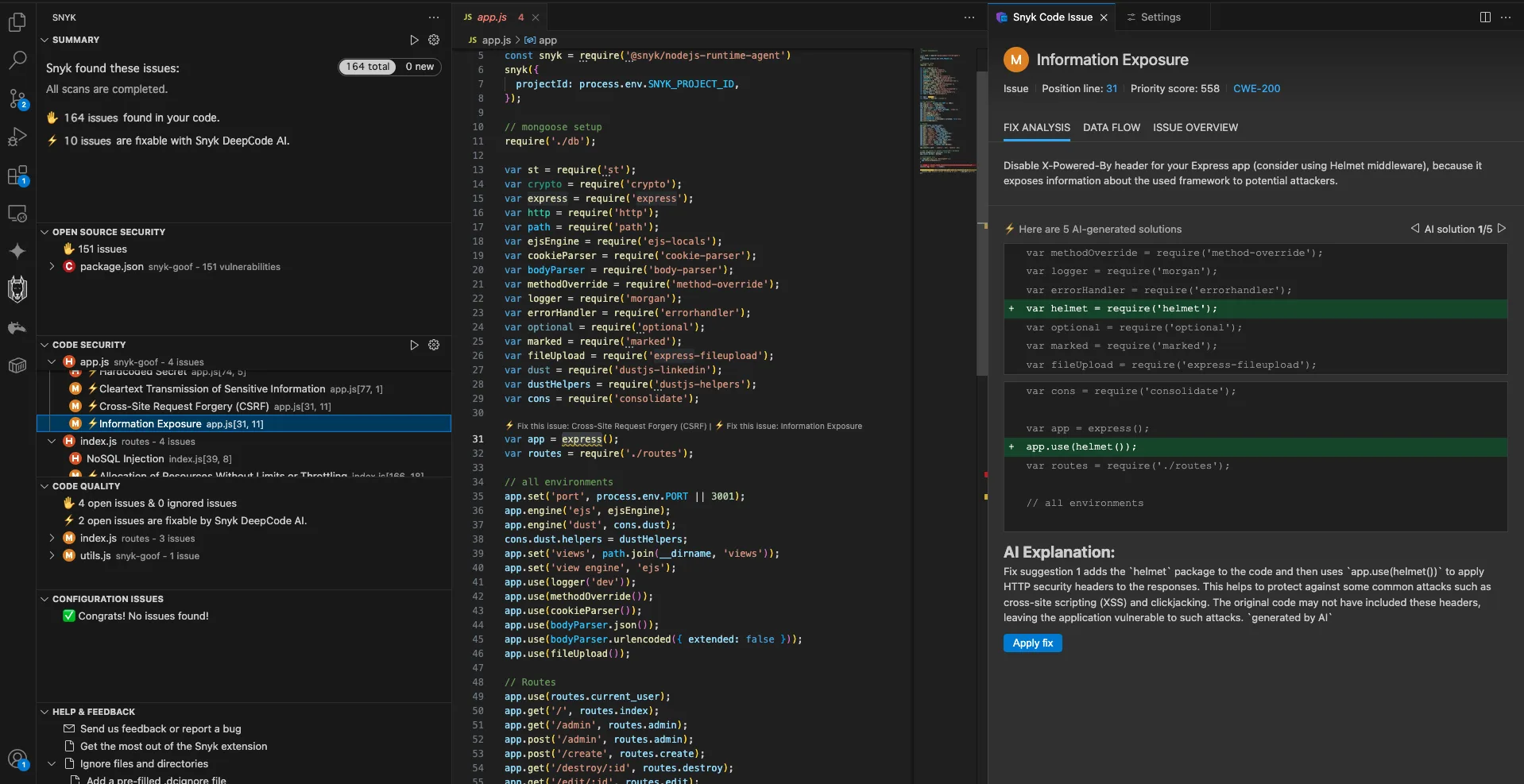
When vulnerabilities are detected, Snyk Code provides AI-generated fix suggestions that show developers exactly how to remediate issues.

Key Features

Real-Time IDE Integration

Snyk Code integrates directly into popular IDEs including VS Code, IntelliJ IDEA, PyCharm, Eclipse, and Visual Studio.

The extension scans code as you type, highlighting security issues inline with explanations and suggested fixes.

This immediate feedback loop helps developers learn secure coding practices while maintaining their flow state.

// Snyk Code would flag this SQL injection vulnerability in real-time
const query = "SELECT * FROM users WHERE id = " + userId;
// Suggested fix: Use parameterized queries
const query = "SELECT * FROM users WHERE id = ?";

AI-Powered Fix Suggestions

When Snyk Code identifies a vulnerability, it provides context-aware remediation guidance generated by machine learning models.

These suggestions consider your specific code context rather than offering generic advice, making fixes more actionable and reducing the time developers spend researching how to address issues.

Semantic Code Analysis

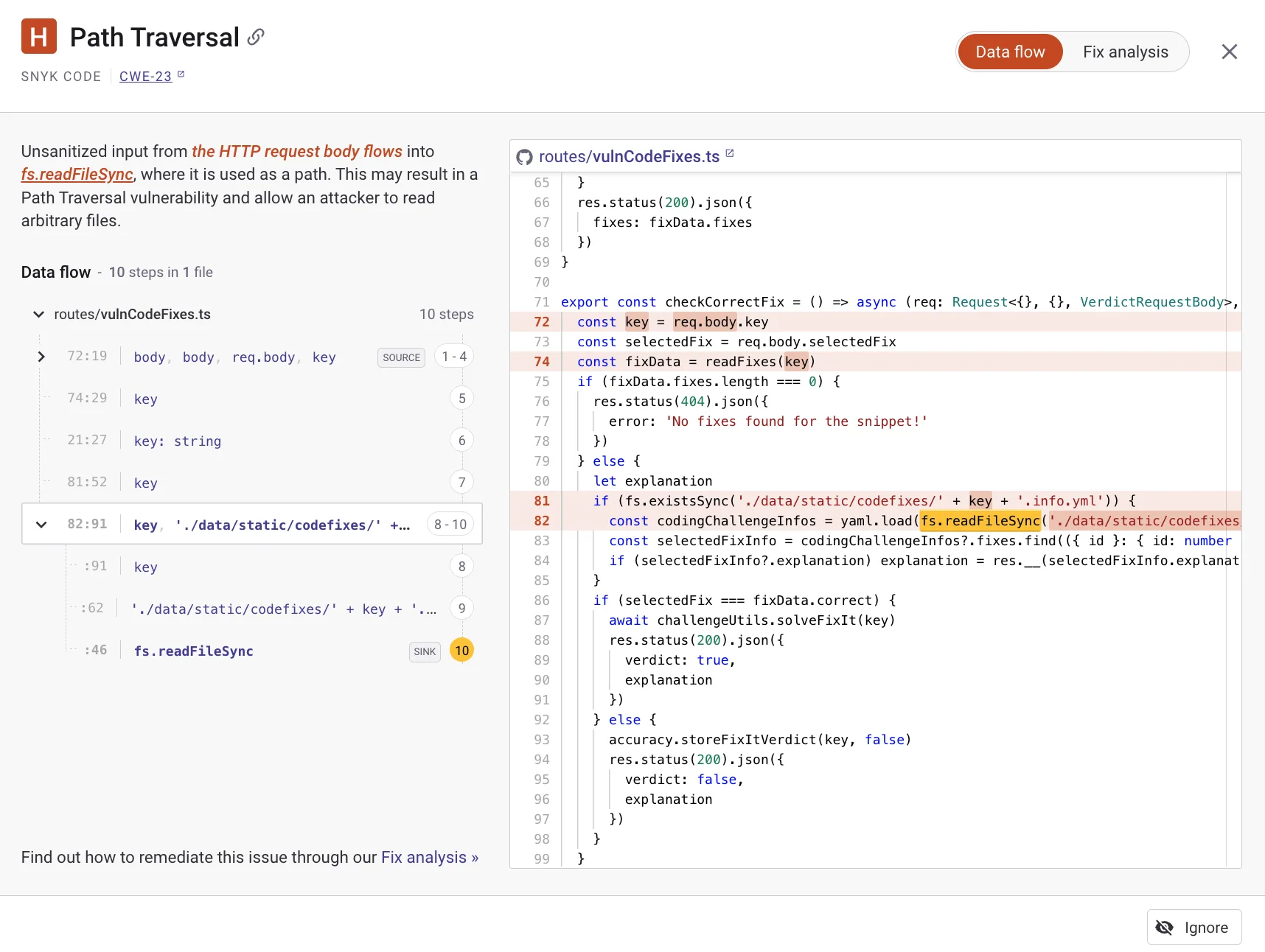
Unlike pattern-matching SAST tools, Snyk Code builds a semantic understanding of your codebase through data flow analysis.

The engine traces how data moves through your application, identifying vulnerabilities that span multiple files and functions.

This approach catches complex issues like second-order SQL injection that simpler tools miss.
Fast Scan Performance

Snyk Code is engineered for speed, with most scans completing in seconds rather than minutes or hours.

The platform analyzes code without requiring compilation, enabling integration into pre-commit hooks and pull request checks without slowing down development workflows.

Installation and Usage

IDE Extension

Install Snyk Code directly in your IDE:

VS Code:

  1. Open Extensions (Ctrl+Shift+X)
  2. Search for “Snyk Security”
  3. Click Install and authenticate with your Snyk account

IntelliJ IDEA:

  1. Go to Settings > Plugins
  2. Search for “Snyk Security”
  3. Install and restart the IDE

CLI Installation

# Install Snyk CLI via npm
npm install -g snyk

# Authenticate with your account
snyk auth

# Run a code scan
snyk code test

# Output results in SARIF format
snyk code test --sarif-file-output=results.sarif

Scanning a Project

# Navigate to your project directory
cd /path/to/your/project

# Run Snyk Code analysis
snyk code test

# Scan with severity threshold
snyk code test --severity-threshold=high

# Generate JSON report
snyk code test --json > snyk-code-results.json

CI/CD Integration

GitHub Actions

name: Snyk Code Security Scan
on:
  push:
    branches: [main, develop]
  pull_request:
    branches: [main]

jobs:
  snyk-code:
    runs-on: ubuntu-latest
    steps:
      - uses: actions/checkout@v4

      - name: Set up Snyk CLI
        uses: snyk/actions/setup@master

      - name: Run Snyk Code Test
        env:
          SNYK_TOKEN: ${{ secrets.SNYK_TOKEN }}
        run: snyk code test --sarif-file-output=snyk-code.sarif

      - name: Upload SARIF to GitHub
        uses: github/codeql-action/upload-sarif@v3
        with:
          sarif_file: snyk-code.sarif

GitLab CI

snyk-code-scan:
  stage: security
  image: snyk/snyk:node
  variables:
    SNYK_TOKEN: $SNYK_TOKEN
  script:
    - snyk code test --json > gl-sast-report.json || true
    - snyk-to-html -i gl-sast-report.json -o snyk-code-report.html
  artifacts:
    paths:
      - snyk-code-report.html
    reports:
      sast: gl-sast-report.json
  rules:
    - if: $CI_PIPELINE_SOURCE == "merge_request_event"
    - if: $CI_COMMIT_BRANCH == $CI_DEFAULT_BRANCH

Jenkins Pipeline

pipeline {
    agent any
    environment {
        SNYK_TOKEN = credentials('snyk-token')
    }
    stages {
        stage('Snyk Code Scan') {
            steps {
                sh 'npm install -g snyk'
                sh 'snyk code test --severity-threshold=high || true'
            }
        }
    }
    post {
        always {
            sh 'snyk code test --json > snyk-results.json || true'
            archiveArtifacts artifacts: 'snyk-results.json'
        }
    }
}

When to Use Snyk Code

Snyk Code is particularly well-suited for:

  • Developer-centric organizations: Teams that want security feedback integrated directly into developer workflows rather than as a separate gate
  • Fast-paced development: Organizations shipping code frequently that need security scans completing in seconds, not hours
  • Modern tech stacks: Teams using JavaScript, TypeScript, Python, Go, or other languages with strong Snyk Code support
  • Existing Snyk users: Organizations already using Snyk Open Source or Container that want unified security visibility

Consider alternatives if you need:

  • On-premises deployment: Snyk Code is primarily cloud-based, though Snyk does offer on-premises options for enterprise customers
  • Regulatory compliance reports: Some compliance frameworks may require specific SAST vendor certifications
  • Legacy language support: COBOL, Fortran, or other legacy languages may have limited coverage

Comparison with Traditional SAST

AspectSnyk CodeTraditional SAST
Scan SpeedSecondsMinutes to hours
Build RequiredNoOften yes
False Positive RateLowTypically higher
IDE IntegrationReal-timeUsually batch
Fix SuggestionsAI-powered, contextualGeneric guidance
Setup ComplexityMinimalOften complex

Platform Integration

Snyk Code is part of the broader Snyk Developer Security Platform, which includes:

  • Snyk Open Source: Software Composition Analysis (SCA)
  • Snyk Container: Container image scanning
  • Snyk IaC: Infrastructure as Code security
  • Snyk Cloud: Cloud security posture management

This integration enables unified visibility across application security domains from a single dashboard, with consistent developer experience and consolidated reporting.